
Organize, control, and audit access to all your infrastructure
WarnHack Terminal is the privileged access platform for modern teams — SSH-compatible and built on industry-standard protocols.
Organize
Group servers and people by role, project, and environment — one clear access map.
Control
Zero standing access. Grant, scope, and auto-revoke the moment it is no longer needed.
Audit
Every session and command recorded with CloudRelay — SOC 2 & ISO 27001-ready trails.
Security is not the pitch — it is the outcome. When access is finally organized, tracked, and controlled, stronger security comes built in.
Comparing vendors? See Terminal vs Teleport, StrongDM & more
platform available now
session & command logged
standing access by default
& ISO 27001-ready audit trail
Access you can organize, prove, and control
Terminal turns scattered SSH keys and blind spots into a single, auditable access layer — the operational win first, the security win for free.
Organize access in one place
Bring every server under one access layer. Grant access by user and role instead of scattering SSH keys nobody fully tracks.
Track every session & command
CloudRelay records who connected, what they reached, and every command they ran — a complete, human-readable audit trail.
Auto-revoke, zero standing access
Grant time-bound access that expires on its own, or revoke instantly. No lingering keys, no standing privileges to hunt down.
Compliance made easier
The access controls and audit evidence auditors ask for — mapped to SOC 2 and ISO 27001 — without stitching together extra tooling.
AI assistant, live monitoring, and Windows desktop — built in
Terminal has grown past access and audit. The AI assistant and real-time monitoring are live in production today, and Windows remote desktop is rolling out in beta — all governed by the same roles, approvals, and audit trail as every human session.
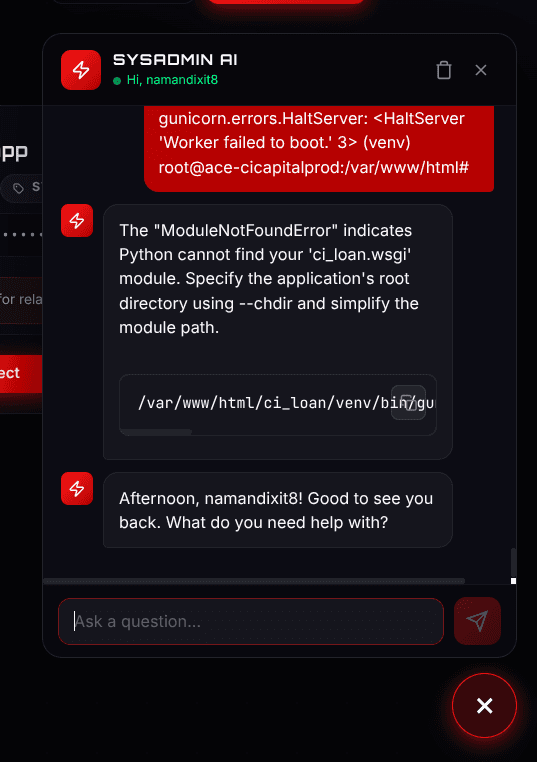
AI-Powered Server Assistant
Chat with your servers. WarnHack's built-in AI assistant can inspect, diagnose, and operate your infrastructure — while you stay in full control.
Three access modes
Ask, Read-Only, and Full Access. In Read-Only mode the AI can only run a server-approved allowlist of safe, non-modifying commands — enforced server-side.
Guided mode
The AI works plan-first: it asks one question at a time, inspects, proposes a numbered plan with risk tags, and executes one step per message with your confirmation.
Terminal-aware
It sees your active server and terminal scrollback, so you can ask “what just failed?” about what is on your screen.
Every AI action is audited
AI-run commands flow through the same pipeline as a human: risk classification, approval prompts for critical commands, automatic secret masking, and a full command log.
ChatGPT-style interface
Searchable conversations, pinned threads, streamed answers, and a live step-by-step activity view of every tool the AI used.
Real-Time Server Monitoring
Live health for every server — metrics and processes, not just ping checks.
- Live CPU, memory, disk, load average, and uptime per server — refreshed every 5 seconds with data-freshness cues.
- Clear health states — healthy, warning, critical, offline — with threshold-colored metric bars and a rolling CPU sparkline.
- Per-server inspector with 24-hour CPU and memory charts (30 days of history retained) and a live top-processes table, filterable by name or PID.
- Two views: compact cards for a wall of servers, a dense sortable table for large fleets — drill into any server without leaving the page.
Windows Remote Desktop in the Browser
Open a full Windows desktop from WarnHack — no RDP client, no VPN, no open ports.
Windows Server 2022 — live desktop
- Streams the real interactive Windows desktop over WarnHack’s own secure relay — H.264 video with low-latency mouse and keyboard input.
- Decoded natively in the browser; RDP port 3389 never has to face the internet.
- One-line PowerShell install for the Windows agent, with an optional logon credential for unattended access when nobody is signed in.
- Single-use, short-lived session tokens and role-based access — desktop sessions are governed like every other WarnHack session.
Beta status: backend, relay, and agent are deployed. We are finishing end-to-end verification of the full agent → relay → browser loop on a fresh install before removing the beta label.
Also built in
MCP integration
Connect Claude Desktop, Cursor, or any MCP client to your servers: run commands, read metrics and status, and manage files — with scoped API keys, expiry, one-click revoke, and human approval for risky commands.
File manager
Browse, upload, download, create, rename, and delete files on any connected server — inside the terminal workspace or as a standalone page.
Multi-tab terminal workspace
Connecting opens a new tab instead of replacing your session. Split panes, sessions that survive navigation and page reloads, and slide-over drawers for Files, Metrics, and Notes.
Server-scoped notes
Capture runbooks and context per server, so the answer lives next to the sessions that need it.
Modern command audit
Session-grouped command history with severity tags, filter chips, analytics, exports, and per-server audit reports.
Passkeys (WebAuthn)
Passwordless MFA built in — sign in with a passkey instead of a password or one-time codes.
CloudRelay: the control plane for infrastructure access
Every connection flows through CloudRelay, WarnHack's access relay. It is how Terminal stays SSH-compatible while giving you the visibility and control that raw SSH keys never could — recording each session, capturing every command, and enforcing revocation automatically.
Think of it as a system of record for access: who connected, to what, when, and exactly what they did — all on open, industry-standard protocols.
Full access logs
Every login, from every user, to every server — captured automatically, no agent tuning per host.
Command-level recording
See the exact commands each user ran in every session, not just that a connection happened.
Automatic revocation
Access is identity-based and time-bound. Expire it on a schedule or revoke it everywhere, instantly.
Industry-standard protocols
SSH-compatible and built on open, standard protocols — no proprietary lock-in forced onto your stack.
From key sprawl to access you can govern
What changes with WarnHack Terminal
Access is granted by identity and role, not shared secrets.
Every session and command is recorded and easy to review.
Revocation is instant and compliance evidence is always ready.
Engineering & DevOps teams
Control production and staging access cleanly as the team and server count grow.
Compliance-driven teams
Meet SOC 2, ISO 27001, and customer security reviews with access control and audit built in.
MSPs & hosting providers
Manage and prove client access across many environments without key sprawl.
Control in three steps, no rip-and-replace
Step 1
Connect your infrastructure
Bring your servers under WarnHack Terminal. It is SSH-compatible, so there is no rip-and-replace of what already works.
Step 2
Define who gets access
Assign access by user and role, and grant just-in-time, time-bound access instead of handing out standing keys.
Step 3
Track, prove, and revoke
CloudRelay logs every session and command. Review activity, export evidence for audits, and revoke access instantly.
One control plane for access and audit
Central control, managed servers, and a session-and-command audit trail — plus the AI assistant, live monitoring, and Windows desktop views that ship alongside them.
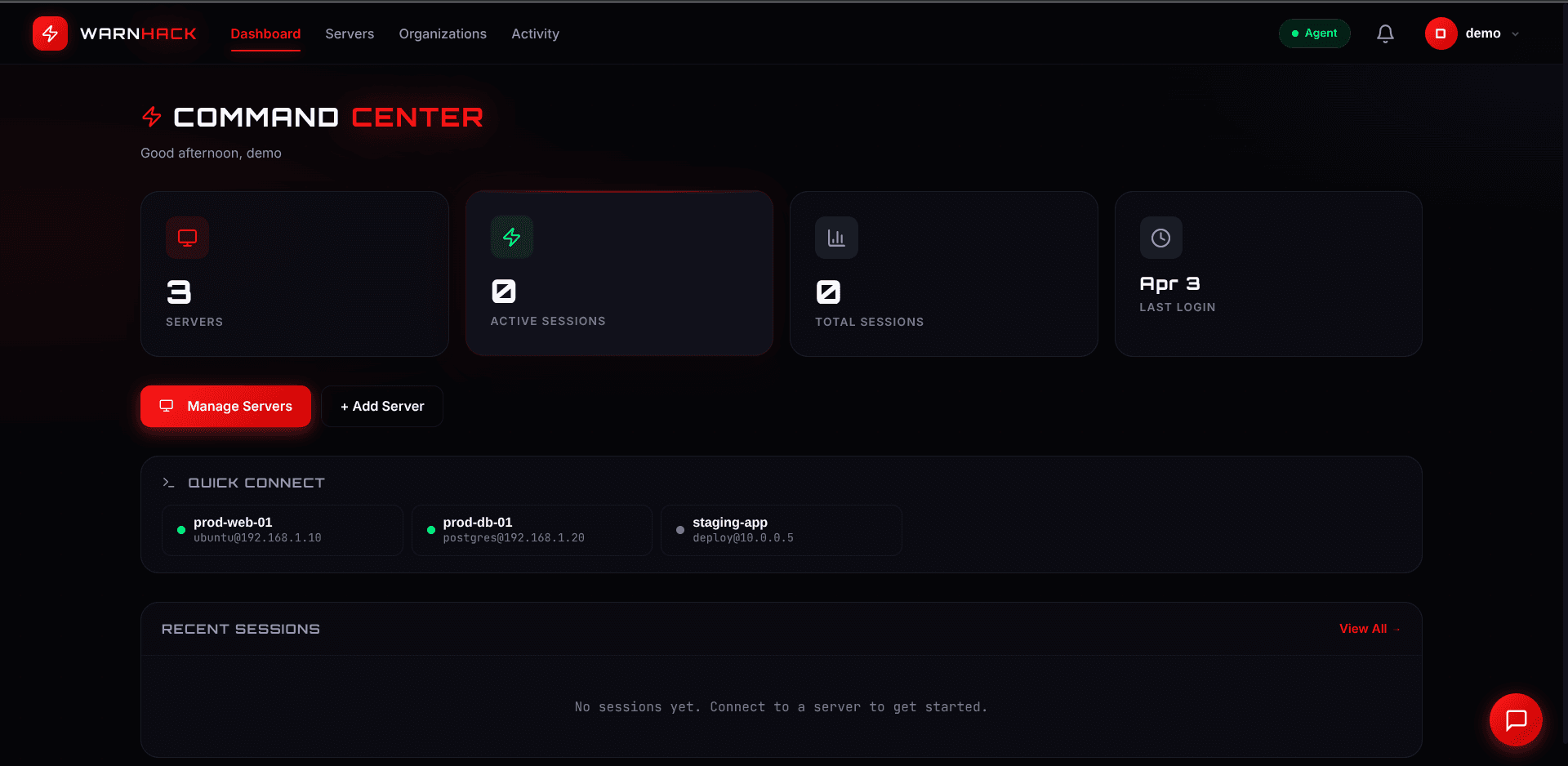
Command Center
See servers, active sessions, and access from a single control plane.
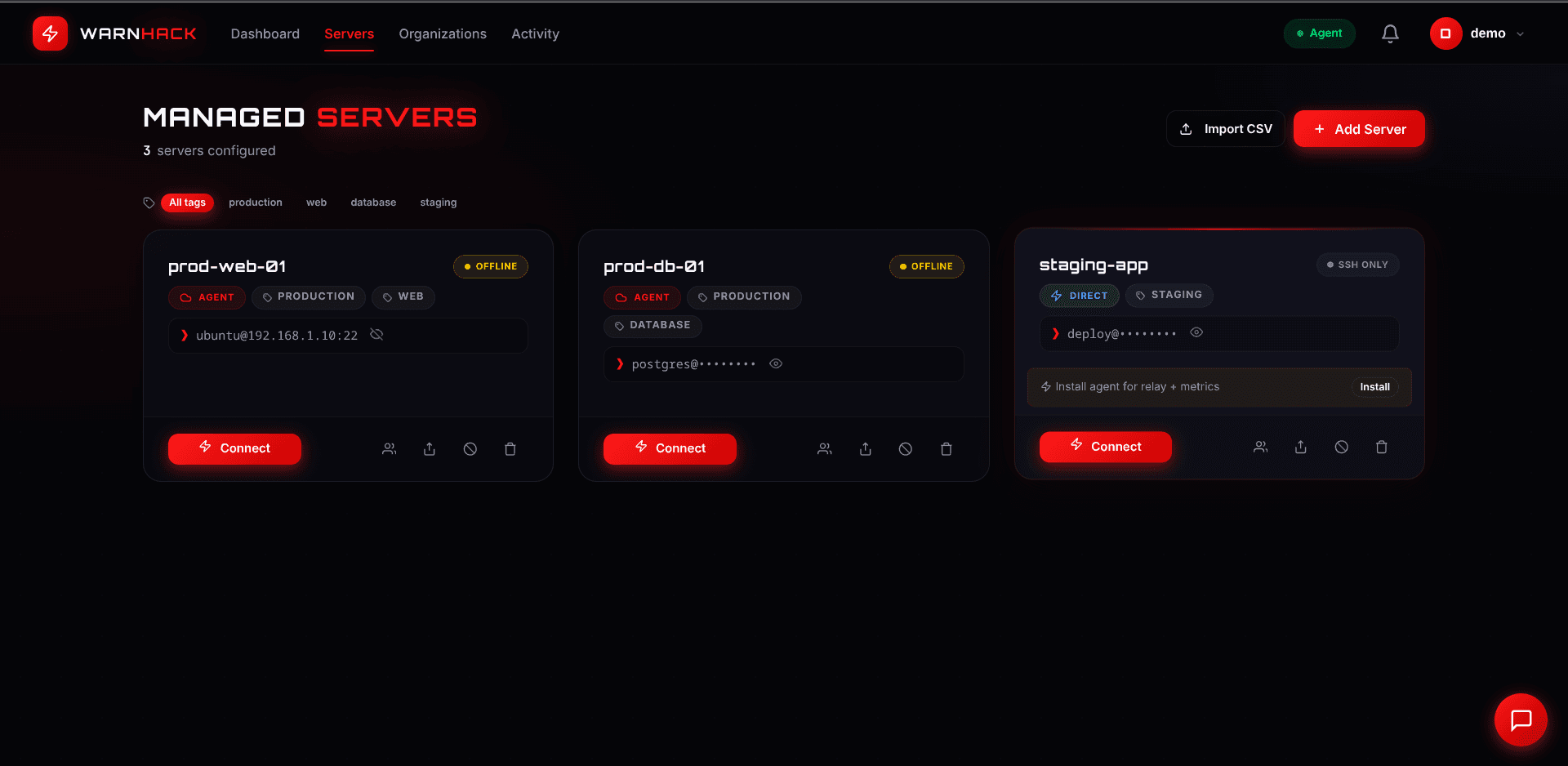
Managed Servers
Organize infrastructure and control who can reach each server.
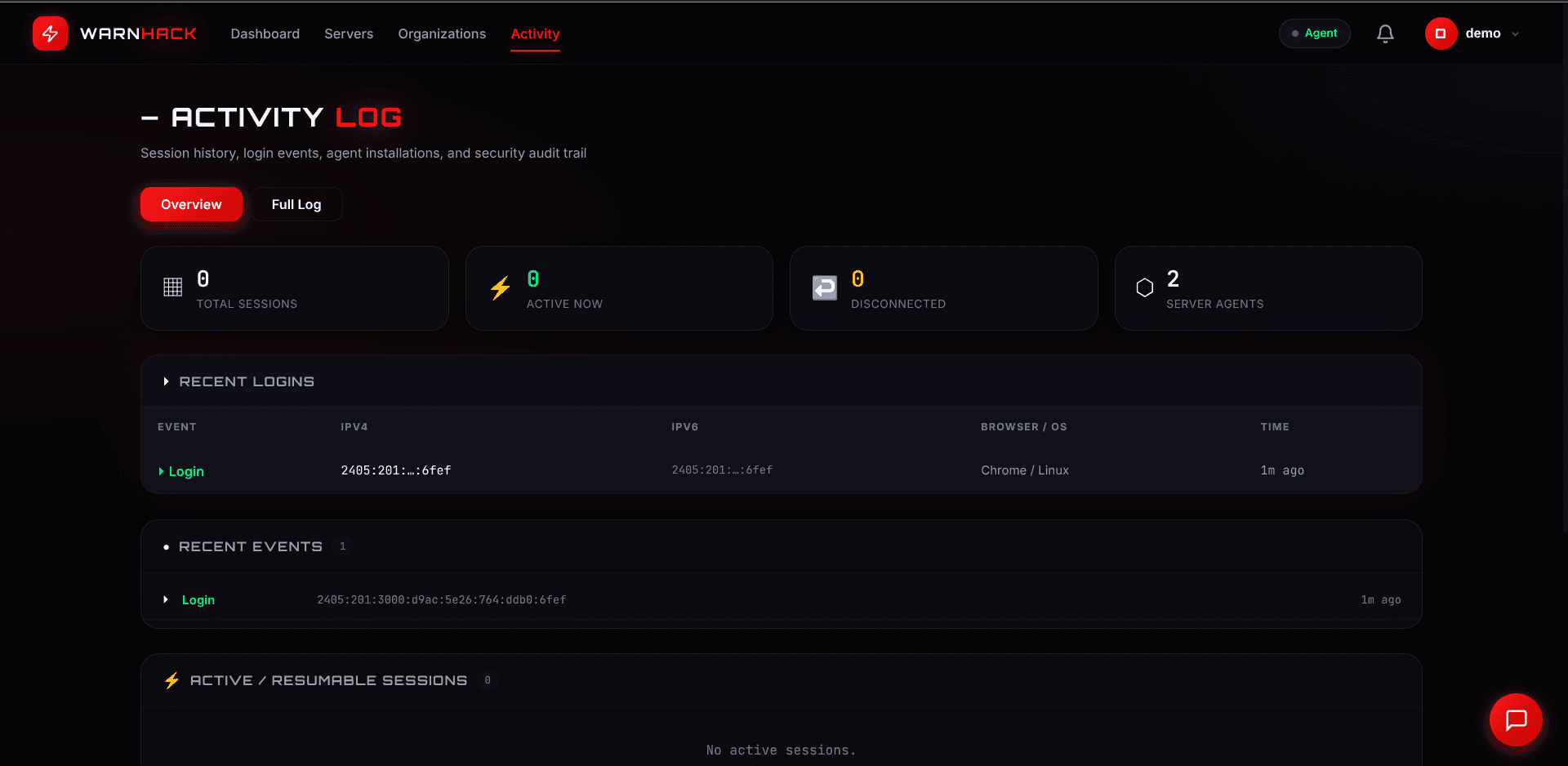
Audit Log
Review sessions and commands in a clean, exportable audit trail.
 Live
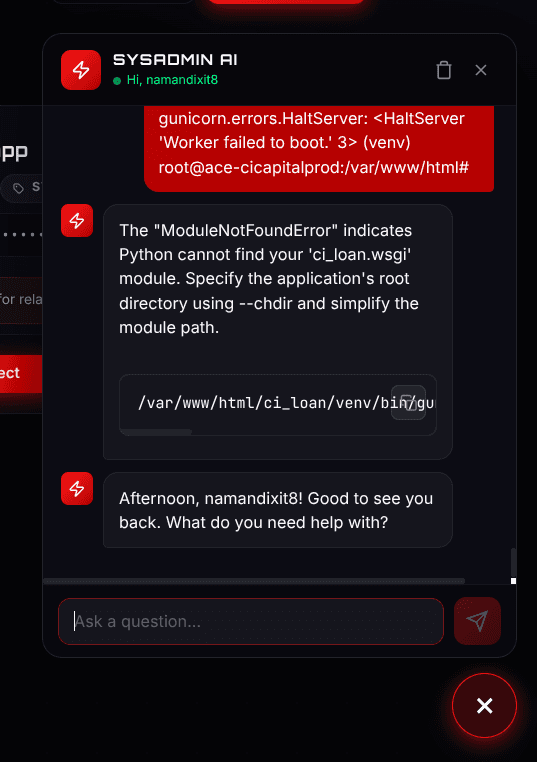
LiveAI Assistant
Chat with your servers. Inspect, diagnose, and operate in Ask, Read-Only, or Full Access mode — every AI-run command audited like your own.
Server Monitoring
Live CPU, memory, disk, and load per server, refreshed every 5 seconds — with health states, 24-hour charts, and a live top-processes table.
Windows Server 2022 — live desktop
Windows Desktop
A full Windows desktop in the browser over WarnHack’s own relay — no RDP client, no VPN, no open ports. Currently in beta.
Without WarnHack Terminal
Access is a pile of shared keys and standing credentials nobody fully tracks.
You can see that someone connected — but not what they actually did.
Offboarding and revocation are manual, slow, and easy to miss.
Audit prep means scrambling to reconstruct who had access to what.
With WarnHack Terminal
Every user gets identity-based, least-privilege access you can see at a glance.
CloudRelay records every session and command in one audit trail.
Access is time-bound and revocable instantly — zero standing privileges.
SOC 2 and ISO 27001 evidence is ready the moment auditors ask.
Solve the access problems that keep showing up in search
Whether you are cleaning up shared keys, retiring a bastion, or proving sessions for audit — Terminal is the managed layer that makes it operational.
SSH key management
Replace shared SSH keys
Stop copying the same private key across laptops. Grant identity-based access by role, expire it automatically, and revoke it when someone leaves.
Open use caseBastion alternative
Replace the bastion / jump host
You do not need another box to harden. Browser sessions go through CloudRelay with full session and command logs — no jump-box maintenance.
Open use caseSSH session recording
Record SSH sessions for audit
See who connected, to which server, and every command they ran. Export evidence for SOC 2, ISO 27001, and customer security questionnaires.
Open use caseTeleport, StrongDM, Bastillion — without the baggage
Honest side-by-side comparisons for teams evaluating browser SSH, zero-trust access, and PAM-lite tools. No FUD — clear tradeoffs.
Migrate off shared SSH keys in ~10 minutes
Walkthrough: invite a user, connect a host, open browser SSH, review CloudRelay audit.
Video embed not configured yet. Script ready for production in docs/TERMINAL_DEMO_VIDEO_SCRIPT.md.
Set NEXT_PUBLIC_TERMINAL_DEMO_VIDEO_URL to a YouTube embed URL after upload.
Simple, transparent pricing
Start free with up to 5 servers and upgrade as your team grows. No procurement cycle, no hidden fees.
Free
For solo developers getting started with secure access.
- Up to 5 servers
- Browser-based SSH access
- AI server assistant & live monitoring
- Session & command logging
- Community support
Individual
For individuals who need more room, control, and audit.
- Everything in Free
- More servers & users
- Full audit trail with export
- Time-bound access & instant revocation
- Email support
Team
For growing teams managing shared infrastructure.
- Everything in Individual
- Role-based team access
- Organization management
- Shared audit & compliance reports
- Priority support
Enterprise
For complex rollouts, scale, and compliance requirements.
- Everything in Team
- Unlimited servers & users
- SSO / SAML & custom integrations
- SOC 2 & ISO 27001 evidence support
- Dedicated onboarding & SLA
Included in current plans at no extra cost: AI server assistant, live server monitoring, file manager, multi-tab terminal, and passkeys. Windows remote desktop is available in beta.
All prices in Indian Rupees (₹). GST invoice available. Need something custom? Talk to our sales team.
The questions buyers ask about access & PAM
Clear answers on category, Teleport/StrongDM fit, CloudRelay, bastions, and compliance — the things teams check before choosing a plan.
See full pricingIs WarnHack Terminal a PAM (privileged access management) tool?
It is a modern infrastructure access and PAM-lite platform: role-based access, session and command audit, and instant revocation — without the cost, procurement, and complexity of legacy enterprise PAM like CyberArk-class tools.
Is WarnHack Terminal a Teleport alternative?
Yes for teams that want browser SSH, audit, and access control without self-hosting Teleport or paying for a full enterprise identity platform. See our full Teleport comparison for ops cost and setup differences.
Is WarnHack Terminal a StrongDM alternative?
Yes for engineering teams under ~200 people who need browser access, RBAC, and audit without a sales-led enterprise rollout. Public plans start free; paid tiers list transparent INR pricing.
What is CloudRelay?
CloudRelay is WarnHack's access relay. Every connection flows through it, so it records full access logs, captures the commands each user runs, and enforces automatic revocation — on industry-standard protocols.
Is there an AI assistant?
Yes — it is live in production. The built-in AI server assistant inspects, diagnoses, and operates your infrastructure while you stay in control. Pick Ask, Read-Only, or Full Access mode; in Read-Only it can only run a server-approved allowlist of safe, non-modifying commands, enforced server-side. In guided mode it proposes a numbered plan with risk tags and executes one step at a time with your confirmation. It even sees your active server and terminal scrollback, so you can ask what just failed. Every AI-run command flows through the same audited pipeline as a human one — risk classification, approval prompts for critical commands, and automatic secret masking.
Can I access Windows servers?
Yes — Windows remote desktop is available in beta. WarnHack streams the real interactive Windows desktop in the browser over its own secure relay (H.264 video with low-latency mouse and keyboard input), so RDP port 3389 never has to face the internet. The Windows agent installs with one PowerShell line, and desktop sessions use single-use, short-lived tokens with role-based access — governed like every other WarnHack session. We keep the beta label while we finish re-verifying the full agent → relay → browser loop on a fresh install.
Do you provide monitoring?
Yes — live in production and included in current plans. Every server gets live CPU, memory, disk, load average, and uptime, refreshed every 5 seconds, with clear health states (healthy, warning, critical, offline). The per-server inspector shows 24-hour CPU and memory charts — 30 days of history retained — plus a live top-processes table you can filter by name or PID. Choose compact cards for a wall of servers or a dense sortable table for large fleets.
Does this replace SSH?
No. WarnHack Terminal is SSH-compatible. CloudRelay adds the control, visibility, and audit layer around the access you already have — without ripping out OpenSSH.
Can it replace a bastion host?
For most small and mid-size teams, yes. You get mediated access, audit, and revocation without operating a jump host. Multi-cloud and bare metal are supported — not only one cloud provider.
How does it help with SOC 2 and ISO 27001?
Least-privilege access plus a complete trail of sessions and commands gives auditors the evidence they ask for — without scrambling to reconstruct who had which key.
Can I see pricing without talking to sales?
Yes. Free tier (up to 5 servers), Individual from ₹500/month, Team and Enterprise as you grow. Full details on the Terminal pricing page.
Get control of infrastructure access before your next audit
Whether you are cleaning up shared keys, proving who did what, or getting ready for SOC 2 or ISO 27001, WarnHack Terminal gives you the access control and audit trail you need — with stronger security built in.